Hatch Embroidery supports direct wireless design transfers
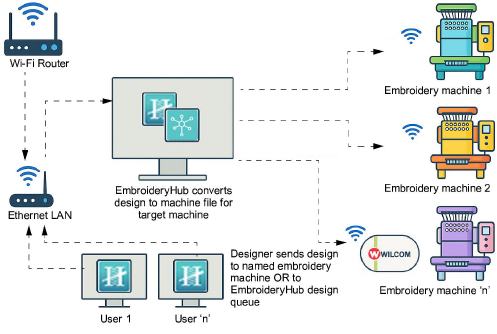
Wireless file transfer is managed through the EmbroideryHub Hatch 4 application. This is included as standard with Hatch Embroidery and provides centralized control of multiple machines.
In HATCH 4: With the latest update, Hatch Embroidery supports direct wireless design transfers to compatible Brother embroidery machines. This integration is the result of an ongoing collaboration between Wilcom and Brother Industries to modernize the embroidery workflow. No more USB drives, no more manual file copying – just send your designs straight from your computer to your machine over Wi-Fi.


Benefits
Faster workflow: Send designs instantly without leaving your desk.
Simpler setup: Connect your Brother machine once, and it’s ready for use in EmbroideryHub.
Less hassle: Eliminate USB transfers and reduce the chance of file errors.
Integrated experience: Manage your machine connections directly within EmbroideryHub Hatch 4 alongside other devices.
Supported Brother machines
Ensure your Brother embroidery machine is one of the supported models. For instance:
PR680W (6 needles)
PR1055X (10 needles)
PR1060W (10 needles)
Related Articles
How to use Transfer Design in Hatch 3
Some users want to connect their embroidery software directly to the machine. This means you can click 'transfer' and the file will go directly to the machine without the need for a USB stick. IMPORTANT: If your embroidery machine can be seen as an ...How to connect directly to my embroidery machine in Hatch 2?
Some users want to connect their embroidery software directly to the machine. This means you can click 'transfer' and the file will go directly to the machine without the need for a USB stick. IMPORTANT: If your embroidery machine can be seen as an ...Is Hatch Embroidery Compatible with My Embroidery Machine?
Hatch Embroidery software is designed to work with most USB-enabled embroidery machines. If your machine supports standard file formats like DST, PES, EXP, and others, Hatch can create the appropriate design files for your machine. How to Confirm ...2-3 Getting Started - Export Designs in Hatch Embroidery
Learn how to save and prepare designs to stitch on your machine. Save, Convert or Export, they are different ways to say essentially the same thing. Hatch Embroidery uses Export or Transfer Design. Learn the differences between stitch files and .EMB ...Can I resell or transfer my Hatch Embroidery software license?
Hatch Embroidery is a digital license and is non-transferable. Below is the agreement you should read and must accept before installing the software. Hatch 3. Hatch 2. Hatch 1. Can I change the sign in information? Yes. You can change the email ...